WBC2026 General Sale January 15, 2026 19:00 JST (18:00 Taiwan Time) - e+ (eplus) First-Come First-Served Complete Purchasing Guide
e+ (eplus) Purchasing Guide Overview
Among the three major ticket platforms in Japan, Ticket Pia (チケットぴあ), Lawson Ticket (ローソンチケット), and e+ (イープラス) are the most prominent companies.
Among these three major platforms, e+ has the best chance for regular people to get tickets in first-come first-served sales!
Why Does e+ Offer the Best Chance?
Because only e+ allows you to:
Complete operations like selecting number of tickets before the sale time
At sale time, you only need to press the "Apply" button
This advantage is absolutely critical!
Ticket Purchase URLs
Domestic Japan:
Overseas:
1. The Reality of Taiwan-Japan Match Ticket Purchasing
Challenges at Sale Time
The general sale time for Taiwan-Japan matches will see a massive influx of traffic, which may result in:
- Connection difficulties
- System congestion
- Extreme difficulty completing the purchase process
In such situations, performing a series of operations like "selecting performance date" → "deciding number of tickets" → "logging in" is extremely difficult.
e+'s Unique Advantage
Ticket Pia and Lawson Ticket:
- Cannot proceed with purchase process before sale time
- Very difficult for regular people to get popular tickets
e+ (eplus):
- Can complete all preparations before sale time
- Only need to press "Apply" button at sale time
- With good luck, can complete purchase instantly
This is why e+ is considered "the platform where regular people have the best chance of getting first-come first-served tickets"!
2. What Device is Most Advantageous?
e+ offers two purchasing methods:
- Computer (web version)
- Smartphone (web version)
1. Computer (Web Version)
Most Recommended! Best Operability!
Advantages:
(1) Large Screen, Convenient Input
- Large screen, convenient keyboard, easy-to-use mouse
- In time-sensitive ticket battles, operation speed is key
(2) Easy to Retry When Congested
After researching online, I discovered that e+ may have these troublesome characteristics:
- Using multiple tabs after certain screens may be judged as "improper operation"
- Using browser back button may also be judged as "improper operation"
- Continuous retries during congestion may also trigger "improper operation"
Partner companies have also announced that they have implemented anti-bot ticket purchasing services
So try to make your operations appear legitimate
This was the announcement at the time:
"Improper operation" = Starting from scratch = Massive time loss
Computer Countermeasure:
- Pre-save "the previous screen that won't be judged as improper operation"
- If an error occurs, can continue trying from the saved screen
2. Smartphone (Web Version)
Using mobile browser to purchase tickets has the same connection difficulty as computers.
Differences from Computer:
- Single screen displays less information
- Operation not as convenient as computer
Conclusion: For popular shows, use computer as priority, while also using phone to try
3. Important Considerations for e+ Ticket Purchasing
1. Avoid "Improper Operation"
Three Major Causes of Triggering "Improper Operation":
(1) Using Multiple Tabs After Certain Screens
- After specific screens on e+, multiple tab operations will be forcibly terminated
- After error, must start from beginning, massive time loss
(2) Using Browser Back Button
- Using back button has high probability of triggering "improper operation"
- Countermeasure: Best not to use back button
- Must use buttons displayed on screen
- Be patient even if processing is slow
- Don't panic and make hasty operations
(3) Unknown Reasons
- Clicking buttons repeatedly during congestion
- Panicked operations
- May all trigger it
Strategy:
- Prepare multiple computers with "final screen before application" open
- If one fails processing, restart from this screen
- Significantly shorten the re-operation steps
2. Complete Login Before Sale Time (Not Required for Overseas) and Advance to Pre-Application Screen
Before ticket sale time, e+ allows you to:
- Decide performance date
- Decide number of tickets to purchase
- Complete login (not required for overseas / only for domestic Japan e+)
- Complete other purchase processes
At sale time, you only need to "press the Apply button"!
With good luck, you can connect instantly and obtain tickets!
Important Reminder:
- Some performances can only be operated at sale time
- Cannot use "just press Apply button" strategy
- Some performances can only start operation a few minutes before sale time
- Recommend preparing early
3. Multiple Accounts Required When Using Multiple Devices for Domestic Japan
Please note! Popular shows are usually very difficult to connect to.
Recommendation: Prepare multiple devices to try simultaneously
Recommended Combination:
- Computer
- Phone web version (one more connection opportunity)
Important: Each device needs a different account for domestic Japan / Overseas uses phone number to identify your order
- Operating with the same account on 2 devices → Judged as improper operation
4. e+ Ticket Purchase Process and Steps
The basic screen flow is the same for computer and mobile browsers.
Differences Between Computer and Phone:
- Computer screen is larger, more convenient operation
- Computer operation is easier
- Computer has advantage when retrying after errors (but...basically Taiwan-Japan match should sell out instantly, so there won't be retry opportunities)
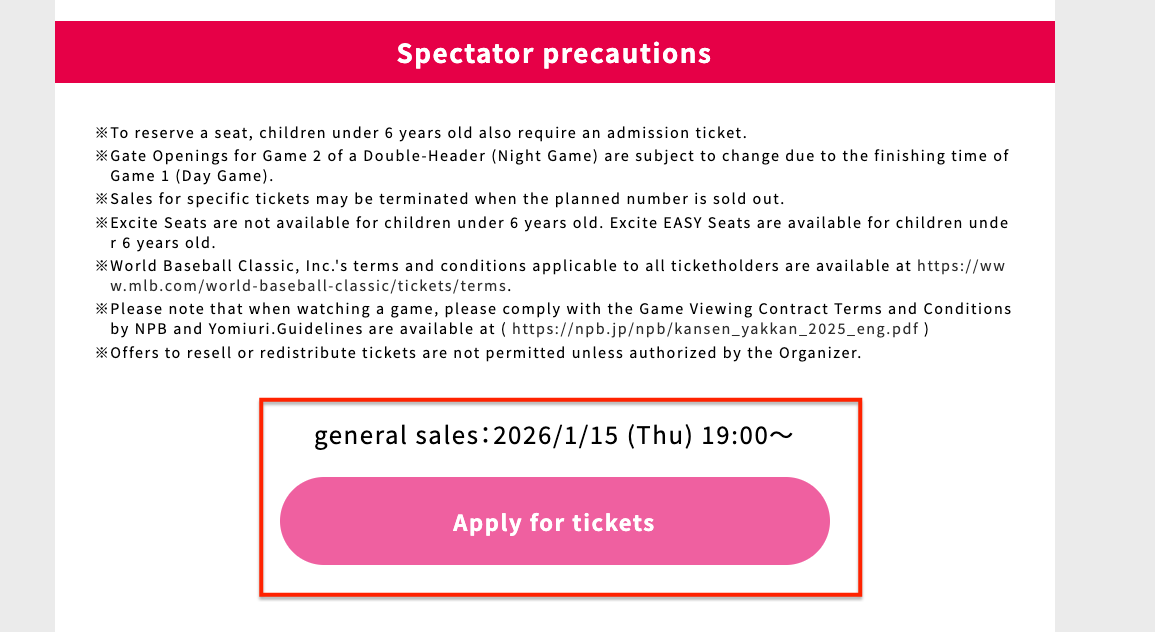
Step 1. Enter WBC Ticket Purchase Page Before Sale at 19:00 JST (18:00 Taiwan Time)
- Click Apply for tickets
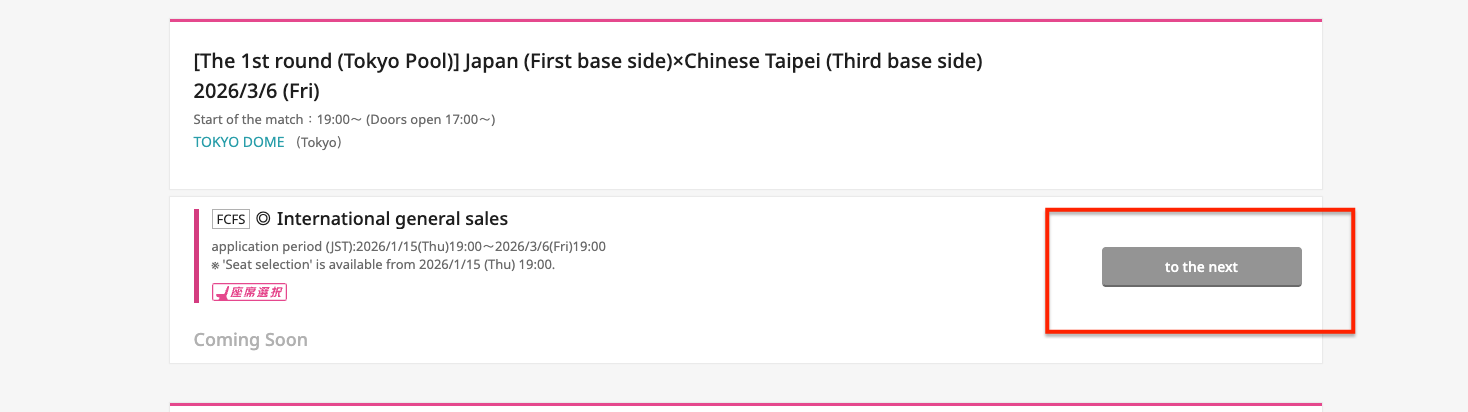
- Find the desired match and click to the next
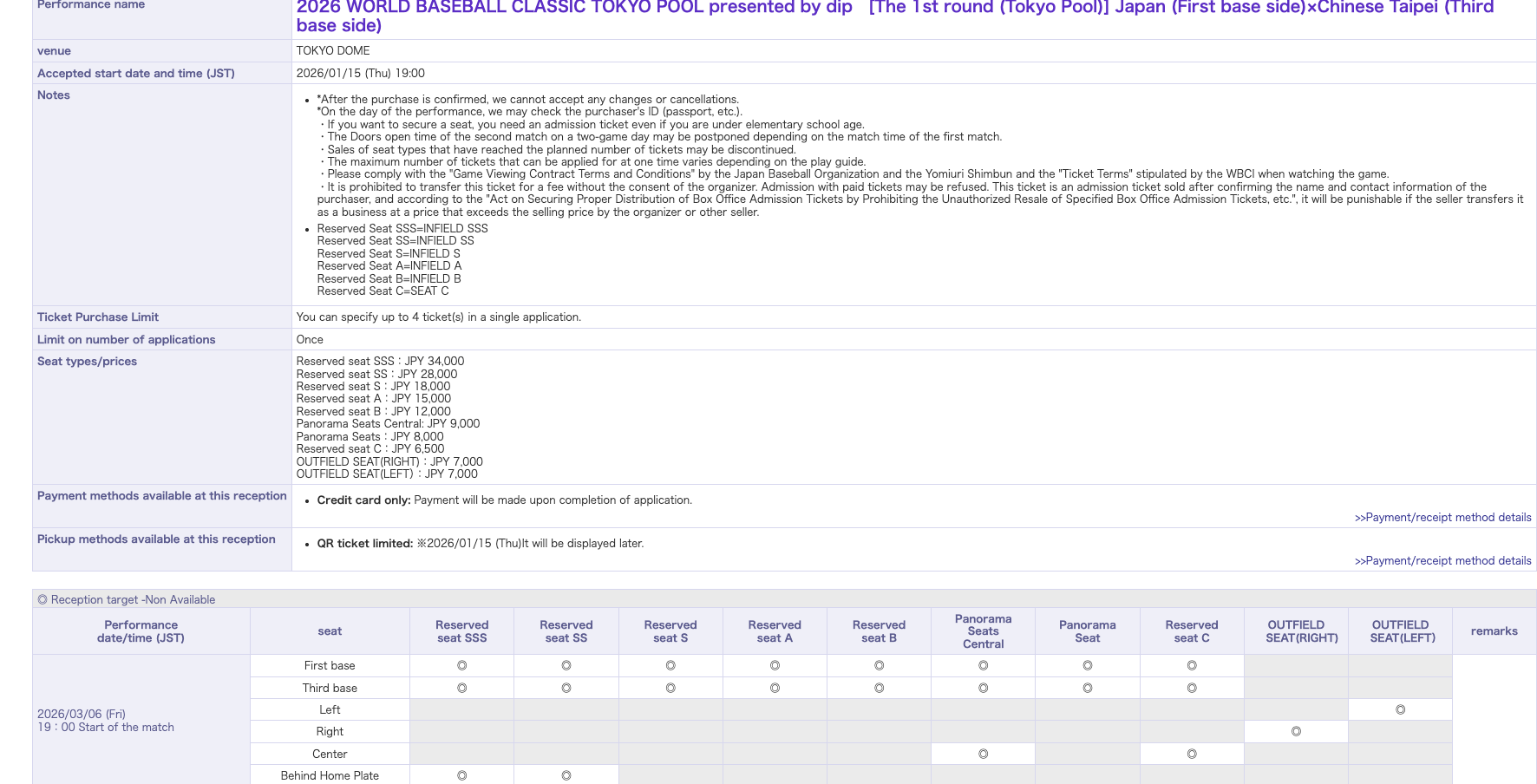
- Will enter the seat description page
Step 2. Enter Personal Information, Phone, Credit Card Information, etc.
Scroll down from before
Start selecting:
- Date and time
- Seat type
- Number of tickets
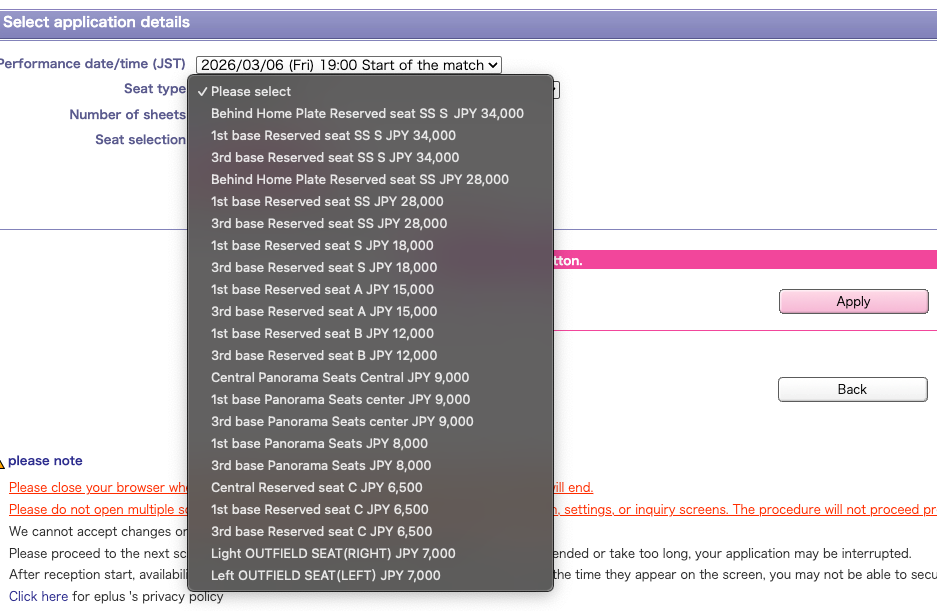
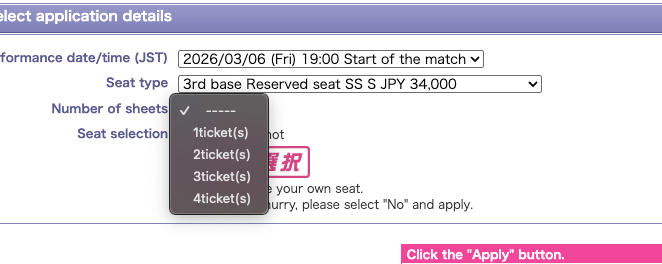
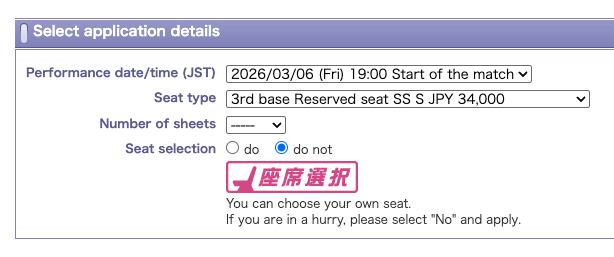
Seat Selection Recommendation: "Don't Choose Seats"
Reason: For popular performances, when choosing seats, tickets sell out very quickly, and you may end up with nothing. Get something first.
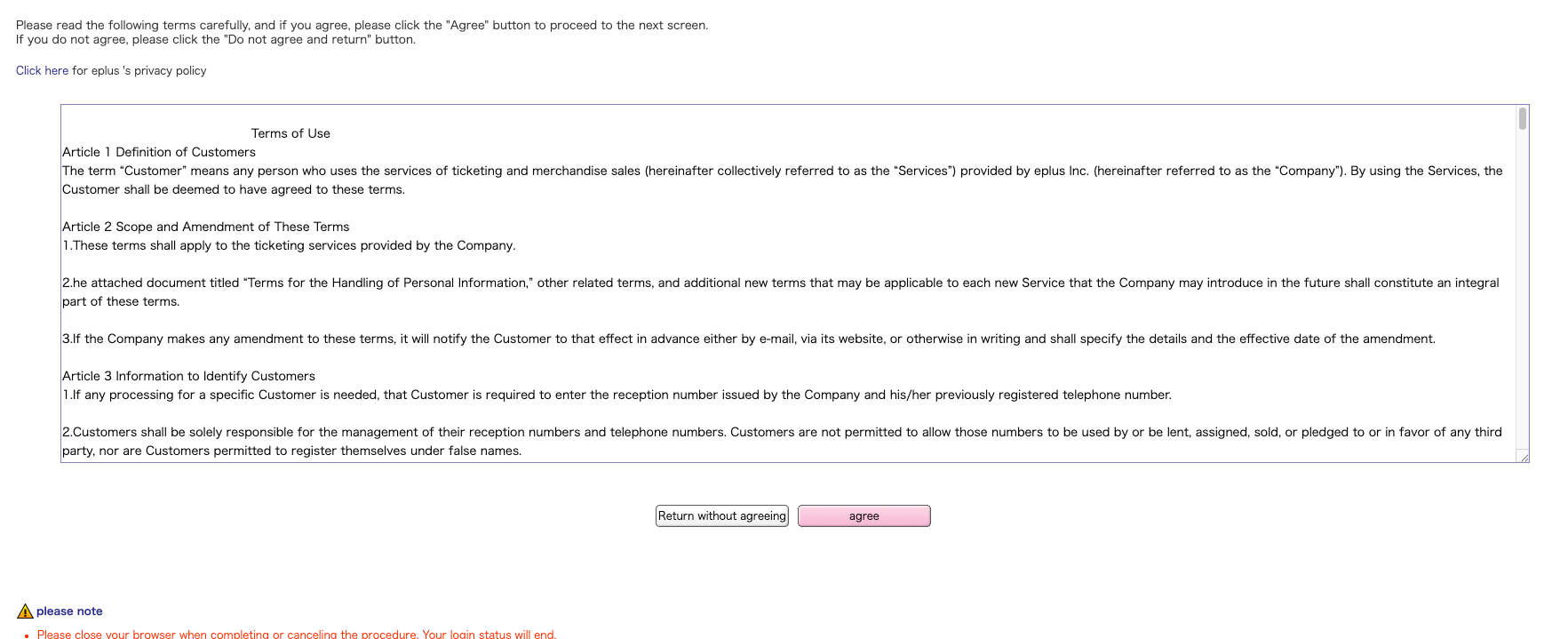
Then click Apply

Agreement terms will pop up, click Agree
Step 3. Enter Personal Information, Credit Card Information, etc.
Enter personal information
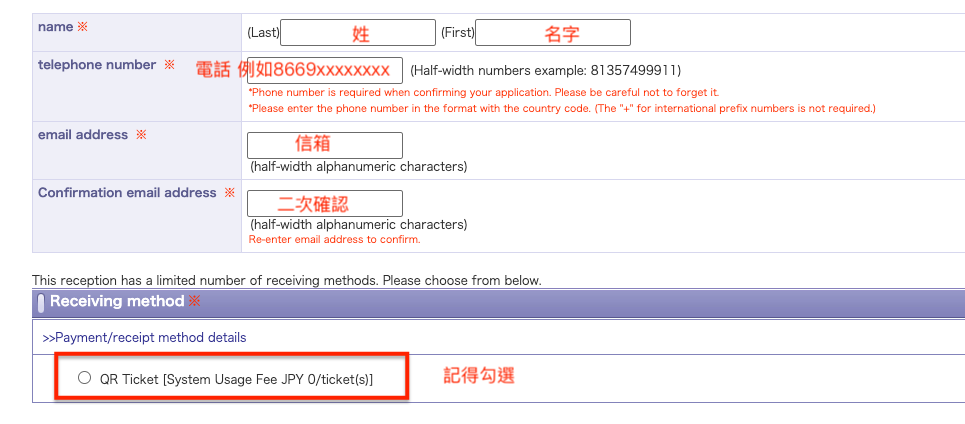
Enter credit card information
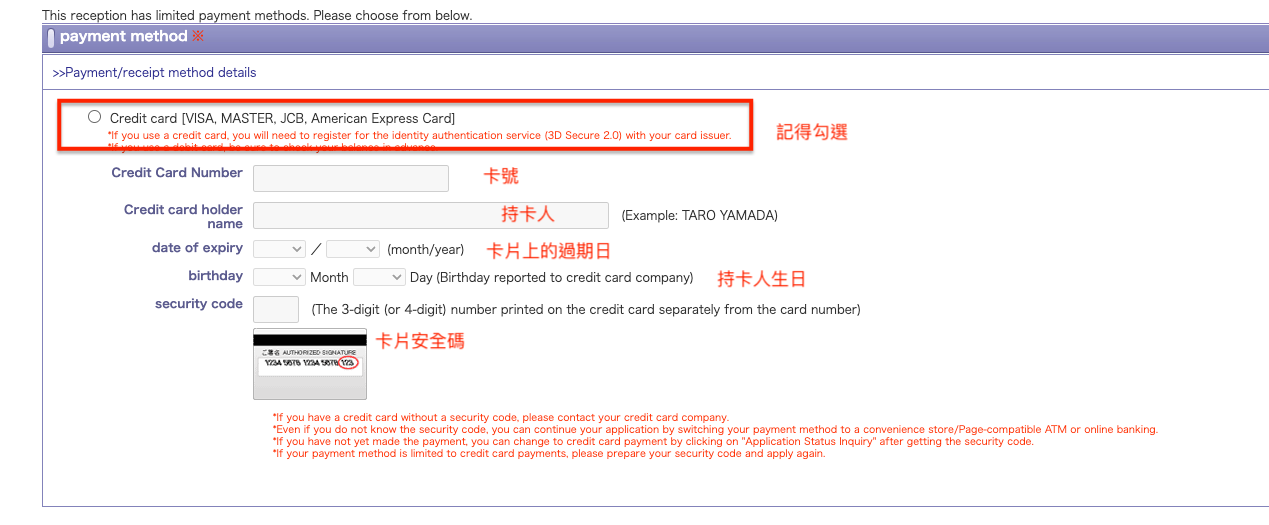
Select residence, passport nationality

Finally click Go to setting

Step 4. Wait Until Before Sale, Press "Apply" Button
After completing the above steps, the browser should have some cache recording your previously entered data But it may disappear after a certain time So make sure to come back and confirm before sale
After confirming application content, press the "Apply" button.
Key Strategy
- Move to this screen before sale time
- Press "Apply" button as soon as sale time arrives
- With good luck, you can successfully obtain tickets!
Note:
- This screen times out after 10 minutes without operation, I assume there's a token mechanism
- To maintain connection, need to press "Apply button" once within 10 minutes to attempt
Step 4. Confirm Application Content
Reaching this screen means you've secured the tickets! Congratulations!
5. Summary: Secrets to Successful e+ Ticket Purchasing
e+'s Unique Advantages
Success Formula:
- Practice thoroughly in advance
- Complete login and other preparations before sale time
- Press apply button at sale time
- With good luck, even SSS tickets are obtainable!
Important Considerations
e+ is very sensitive to the following operations:
- Multiple tab operations
- Back button operations
- Very easy to trigger "improper operation" error
Countermeasure: Practice thoroughly in advance, familiarize yourself with the operation flow
Best Device Combination
Recommended Combination:
- Computer (multiple tab operation advantage, main device)
- Phone web version (increases connection opportunities)
- = 2-device system is most effective
6. Practical Checklist
Preparation Phase
Account Preparation
- If grabbing domestic Japan e+, need account (one per device)
- Remember password or save it on device
Device Preparation
- Computer (main) + phone web version
- Stable internet connection
- Browser tested and working normally (recommend Chrome or Safari)
Practice
- Practice process with non-popular performances
- Familiarize yourself with screen transitions
Day-of Process
30 Minutes Before Sale:
- Log in to all devices / Enter application data
- Go to performance page
- Complete all steps before "Apply" button
10 Minutes Before Sale:
- Confirm you're on "Apply button" screen
- Press button once every 10 minutes to maintain connection
- Stay calm
At Sale Time:
- Press "Apply button" on time
- Choose "○" (tickets available) seats / or let system allocate directly
- Quickly complete subsequent steps
- Don't be greedy for "△" seats
Error Handling
When Errors Occur:
- Don't panic
- Don't use back button
- Use buttons on screen to operate
Conclusion
e+ is the platform where regular people have the best chance of obtaining tickets in first-come first-served sales. With thorough preparation and calm operation, you also have a chance to get tickets for popular performances!
Wishing everyone successful ticket purchasing!
Official Links:
- e+ Official Website: https://eplus.jp/